App Icon Size Chart 2026 (iOS, Android, Web, PWA)
Updated August 1, 2026

Design one 1024×1024 master and you can produce every icon size any platform asks for. That single square is the App Store icon, the Play Store listing icon, and the source every smaller size downsamples from. The rest is knowing which exact pixel dimensions each store and device wants, and this chart lists all of them.
TL;DR. The sizes that actually matter in 2026:
- iOS / iPadOS: submit one 1024×1024 PNG. Xcode generates the device sizes (down to 180×180, 120×120, and smaller).
- Android: a 512×512 Play Store icon plus adaptive icon layers on a 108×108 dp canvas.
- Web favicon: a multi-size
favicon.ico(16/32/48), a scalablefavicon.svg, and a 180×180 Apple touch icon. - PWA: 192×192 and 512×512 PNGs in your web app manifest, minimum.
- Start every one of these from a 1024×1024 source. Design once, export the set.
What size does an app icon need to be?
The one size to design at is 1024×1024 pixels. It's the largest icon any major platform uses, and every smaller size is a clean downscale of it. Apple's App Store icon, Google Play's listing icon, and the largest PWA icon are all either a 1024 master or a shrunk-down copy of one.
You don't hand-draw a dozen sizes. You draw one 1024×1024 image and export the rest. What changes per platform is the set of exported sizes and a few format rules (opacity, rounded corners, file container). Here's the one required size per platform, and the format each demands:
| Platform | The size to start from | Format | Notes |
|---|---|---|---|
| iOS / iPadOS | 1024×1024 | PNG, fully opaque | Xcode generates device sizes from it |
| macOS | 1024×1024 | PNG (.icns / asset catalog) | 16→1024 at 1× and 2× |
| watchOS | 1024×1024 | PNG | App Store marketing size |
| Android | 512×512 | 32-bit PNG | Play listing; adaptive layers are separate |
| Web favicon | 32×32 (in a multi-size .ico) + SVG | ICO + SVG | plus a 180×180 Apple touch icon |
| PWA | 512×512 (and 192×192) | PNG | referenced in the web app manifest |
The sections below break each platform into its full set. If you only read one, read the one you're shipping to.
What are the iOS app icon sizes?
iOS uses a single 1024×1024 PNG as the source, and the App Store icon must be fully opaque, with no alpha channel and no transparency. Don't round the corners yourself either; iOS masks them. Since Xcode 14, the asset catalog takes that one 1024 "single size" and generates the device variants at build time. You can still supply the full set by hand if you want per-size control, and plenty of CI pipelines, widgets, and older toolchains still expect it.
That single-image model still holds, but it's no longer the whole story. Since iOS 26 the icon itself is layered and rendered in Liquid Glass, assembled in Apple's Icon Composer and shipped as one .icon file, and iOS 27 revised the rendering again. Liquid Glass app icons covers the layered model; the pixel sizes below still apply to the asset-catalog route.
Here's the full iOS/iPadOS matrix, straight from Apple's icon documentation:
| Purpose | Size (px) | Scale |
|---|---|---|
| App Store | 1024×1024 | — |
| iPhone app (home screen) | 180×180 | @3x |
| iPhone app (home screen) | 120×120 | @2x |
| iPad Pro app (home screen) | 167×167 | @2x |
| iPad app (home screen) | 152×152 | @2x |
| iPad app (home screen) | 76×76 | @1x |
| Spotlight | 120×120 / 80×80 / 40×40 | @3x / @2x / @1x |
| Settings | 87×87 / 58×58 / 29×29 | @3x / @2x / @1x |
| Notification | 60×60 / 40×40 | @3x / @2x |
Here's the rule that actually gets apps bounced from review: the marketing 1024 icon can't have an alpha channel at all. Device icons are allowed one, but keep transparent pixels out of them. iOS fills transparency with black, so a see-through background turns solid black on the home screen. Design on a filled background and the problem never comes up.
Need the icon itself, not just the sizes? Our iOS icon generator makes an icon to a prompt, and the App Icon Generator tool turns any 1024 into the full Xcode .appiconset.
What size is an Android app icon?
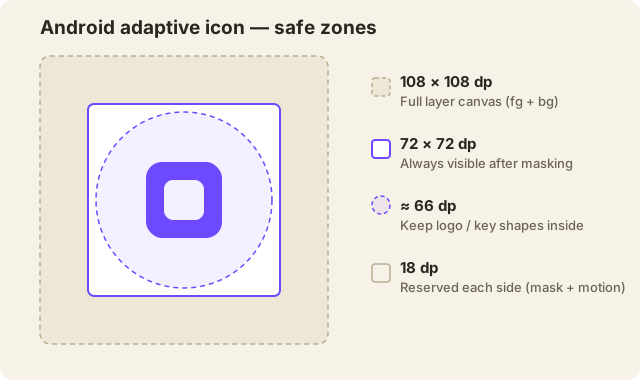
Android has two separate things, sized differently. The Play Store listing icon is 512×512, a 32-bit PNG (alpha allowed), under 1024 KB. The icon on the device is an adaptive icon: a foreground and a background layer, each drawn on a 108×108 dp canvas that the launcher masks into a circle, squircle, or rounded square depending on the phone.
That 108 dp canvas is the part people get wrong. The launcher reserves the outer 18 dp on every side for masking and motion effects, leaving a 72×72 dp area that's always visible. Keep your important shapes inside roughly the inner 66 dp and no mask will ever clip them.
| Purpose | Size |
|---|---|
| Google Play listing | 512×512 px |
| Launcher — mdpi | 48×48 px |
| Launcher — hdpi | 72×72 px |
| Launcher — xhdpi | 96×96 px |
| Launcher — xxhdpi | 144×144 px |
| Launcher — xxxhdpi | 192×192 px |
| Adaptive layer canvas | 108×108 dp (432×432 px at xxxhdpi) |
| Adaptive visible viewport | 72×72 dp |
| Keep-clear safe zone | ~66 dp circle |
Since Android 13 you can also ship a monochrome layer so the launcher can tint the icon for themed home screens. This is no longer the optional extra it once was: Google's Apps Experience Program guideline requires it with no exemptions, and since Android 16 QPR2 the system derives a monochrome version from your artwork anyway if you don't supply one. Android themed icons covers what that means for your icon.
For the density math, the 108 / 72 / 66 dp geometry in detail, and an honest answer about how many of those files a modern project still needs, see Android adaptive icon sizes.
The Android icon generator covers the visual side; the App Icon Generator writes the mipmap-<density> folders, the adaptive-icon XML, and the Play Store 512 in one download.
What are the macOS and watchOS icon sizes?
Both start from the same 1024×1024 master and expand into their own set. macOS icons ship as a .icns (or an Xcode asset catalog) covering 16 up to 1024 at 1× and 2×. watchOS uses a marketing 1024 plus a run of small device sizes.
| Platform | Sizes (px) |
|---|---|
| macOS | 16, 32, 64, 128, 256, 512, 1024 (1× and 2× pairs) |
| watchOS | 1024 (marketing) + device sizes from 44 up to 258 |
macOS icons are allowed transparency, which is the opposite of the iOS rule. That's how you get the classic Mac look, a rounded rectangle sitting in its own space with a soft shadow. So don't flatten one asset and drop it into both platforms without checking the background first.
What favicon sizes do I need?
For the web, three files cover almost every browser in 2026: a multi-size favicon.ico, a scalable favicon.svg, and a 180×180 apple-touch-icon.png. The old pile of a dozen PNGs isn't necessary anymore.
| File | Size(s) | Used by |
|---|---|---|
favicon.ico | 16×16, 32×32, 48×48 (in one file) | Browser tabs, bookmarks, legacy |
favicon.svg | scalable (any) | Modern Chrome, Firefox, Edge; dark-mode aware |
apple-touch-icon.png | 180×180 | iOS "Add to Home Screen" |
android-chrome-192x192.png | 192×192 | Android home screen |
android-chrome-512x512.png | 512×512 | PWA install / splash |
The .ico is a container: one file holds the 16, 32, and 48 frames, and the browser grabs whichever it needs. The SVG is optional but worth adding. It's one small file that stays sharp at any density and can even swap colors for dark mode with a CSS media query. Keep the .ico around as the fallback for browsers that don't render SVG favicons yet.
The HTML is four lines:
<link rel="icon" href="/favicon.ico" sizes="any">
<link rel="icon" type="image/svg+xml" href="/favicon.svg">
<link rel="apple-touch-icon" sizes="180x180" href="/apple-touch-icon.png">
<link rel="manifest" href="/site.webmanifest">
Making just the favicon? The favicon generator outputs this exact set plus the link tags. For the format details and the icon Google shows in search results, see the complete favicon sizes and formats guide.
What icon sizes does a PWA need?
A progressive web app needs at minimum a 192×192 and a 512×512 PNG declared in its web app manifest. That's the bar Chromium checks before it'll offer "Install." If you only provide one, make it the 512, since browsers scale down more cleanly than up.
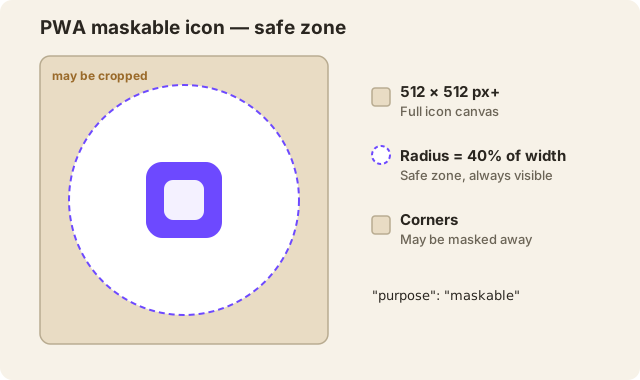
For icons that fill the whole shape on Android (no white plate behind them), add a maskable icon: 512×512 or larger, with your key content inside a centered circle whose radius is 40% of the icon width. Anything outside that circle can be cropped by the mask.
| Purpose | Size | purpose |
|---|---|---|
| Standard icon (minimum) | 192×192 | any |
| Standard icon (minimum) | 512×512 | any |
| Recommended extra | 384×384, 1024×1024 | any |
| Maskable icon | 512×512+ | maskable |
| Themed / monochrome | 512×512 | monochrome |
The manifest entry looks like this:
{
  "icons": [
    { "src": "/icon-192.png", "sizes": "192x192", "type": "image/png" },
    { "src": "/icon-512.png", "sizes": "512x512", "type": "image/png" },
    { "src": "/icon-maskable-512.png", "sizes": "512x512", "type": "image/png", "purpose": "maskable" }
  ]
}
The PWA icon generator and the App Icon Generator both emit these plus a ready site.webmanifest.
Do you really need every size?
Mostly no. You need one good 1024×1024 master and something to export the rest, because modern toolchains collapse most of this list for you. Xcode turns a single 1024 into the whole iOS set. Android Studio's Image Asset wizard handles the mipmaps once you give it your layers. And on the web, three files now cover what used to take ten.
The full pixel set still matters in a few places: CI builds that expect every named file to exist, app widgets and watch complications, older Android versions with no adaptive-icon support, and any pipeline that never runs Xcode's generator. That's the reason a real export writes all of them and not just the master.
That last part is what we build. Our free App Icon Generator runs entirely in your browser, so your image never gets uploaded anywhere, and it writes this exact chart from a single 1024:
icons-export.zip
├─ apple-devices/
│  ├─ AppIcon.appiconset/              # iOS + macOS + watchOS in one catalog
│  │  ├─ Contents.json
│  │  ├─ icon-ios-1024x1024.png
│  │  ├─ icon-ios-60x60@3x.png         # 180×180
│  │  └─ … 16 iOS + 10 macOS + 20 watchOS sizes
│  └─ Messages Icon.stickersiconset/   # iMessage sticker set (+ Contents.json)
├─ android/
│  ├─ mipmap-mdpi … mipmap-xxxhdpi/    # ic_launcher, _round, _foreground
│  ├─ mipmap-anydpi-v26/ic_launcher.xml
│  ├─ drawable/ic_launcher_background.xml
│  └─ playstore-icon.png               # 512×512
├─ web/
│  ├─ favicon-16x16.png · favicon-32x32.png
│  ├─ apple-touch-icon.png             # 180×180
│  ├─ android-chrome-192x192.png · android-chrome-512x512.png
│  └─ site.webmanifest
└─ windows/
   ├─ Square44x44Logo.png … Square310x310Logo.png · Wide310x150Logo.png
   └─ icon.ico                         # 16/24/32/48/256
Upload a 1024, tick the platforms you're shipping to, and unzip the folder. Don't have the icon yet? Generate one from a text prompt first.
FAQ
What is the single most important app icon size?
1024×1024 pixels. It's the App Store and Play Store size, and every smaller icon downsamples from it cleanly. Design at 1024 and export everything else from that one file.
Can I use a JPG for an app icon?
No. Every platform wants PNG (and ICO/SVG for the web favicon). JPG has no transparency and its compression adds artifacts that show badly at small sizes.
Should app icons have rounded corners?
Don't add them yourself. iOS, iPadOS, and most Android launchers apply their own corner mask. Ship a full square image; a pre-rounded icon ends up with a double-rounded, clipped look.
Why is my iOS icon showing a black background?
Because iOS fills transparency with black. The App Store icon has to be fully opaque with no alpha channel, and even the device icons shouldn't contain transparent pixels. Design on a solid, filled background and it goes away.
What's the difference between the 512×512 and the adaptive icon on Android?
The 512×512 is only the Play Store listing image. The icon users actually tap is the adaptive icon: foreground and background layers on a 108×108 dp canvas that the launcher masks to the phone's shape. You need both.
Do I need a separate maskable icon for my PWA?
Only if you want the icon to fill the whole shape on Android without a white plate behind it. Add a 512×512 icon with "purpose": "maskable" and keep your art inside the centered 40%-radius safe circle.
Building the icon itself, not just resizing one? Generate an icon from a text prompt, then run it through the App Icon Generator for the full pack. Already have artwork at the wrong size? The image resizer handles one-off dimensions.