Android Adaptive Icon Sizes: What You Actually Need to Ship

An Android adaptive icon is built on a 108×108 dp canvas, and the launcher icon it replaces was 48×48 dp scaled across five density buckets. Those are the numbers every size chart gives you. The part the charts leave out: if your minSdk is 26 or higher and you supply your layers as vector drawables, you don't need a single one of those density PNGs.
TL;DR:
- Adaptive icon canvas: 108×108 dp. Masked viewport is 72 dp. Guaranteed-visible safe zone is 66 dp.
- Legacy launcher icon: 48×48 dp, exported at 48 / 72 / 96 / 144 / 192 px across mdpi→xxxhdpi.
- Legacy PNGs are for Android 7.1 (API 25) and below. On
minSdk 26+they're dead weight. ic_launcher_roundwas only ever needed on API 25. Adaptive icons replaced it.- Play Store icon: 512×512, 32-bit PNG, under 1024 KB. Always required, never optional.
What size should an Android app icon be?
Two different answers, because Android has two icon systems running side by side.
For the adaptive icon used by Android 8.0 and later, each layer is drawn on a 108×108 dp canvas. For the legacy launcher icon used by Android 7.1 and earlier, the icon is 48×48 dp, exported as a PNG per density bucket. Separately, the Play Store wants a 512×512 px PNG that has nothing to do with either.
| Asset | Size | Where it's used |
|---|---|---|
| Adaptive icon layers | 108×108 dp | Android 8.0 (API 26) and later |
| Legacy launcher icon | 48×48 dp | Android 7.1 (API 25) and earlier |
| Play Store icon | 512×512 px | Play listing, search, top charts |
The density buckets turn those dp values into pixels, which is where the familiar five-row table comes from.
What are the density buckets?
Android groups screens into density buckets and scales your assets by a fixed multiplier from a 160 dpi baseline. The conversion is px = dp × (dpi / 160).
| Bucket | Approx. dpi | Multiplier | Legacy icon (48 dp) | Adaptive layer (108 dp) |
|---|---|---|---|---|
mdpi | 160 | 1.0× (baseline) | 48 px | 108 px |
hdpi | 240 | 1.5× | 72 px | 162 px |
xhdpi | 320 | 2.0× | 96 px | 216 px |
xxhdpi | 480 | 3.0× | 144 px | 324 px |
xxxhdpi | 640 | 4.0× | 192 px | 432 px |
Google's docs also list ldpi at 120 dpi (0.75×) and tvdpi at roughly 213 dpi (1.33×). Neither shows up in practice for launcher icons: Android Studio's Image Asset Studio doesn't generate them, and neither does our export. Treat ldpi as documented rather than practiced.
Launcher icons live in res/mipmap-<density>/, not res/drawable-<density>/. That distinction is deliberate, since the system may load a higher-density launcher icon than the device bucket, and mipmap directories survive density stripping in ways drawable ones don't.
How big is an adaptive icon really? 108, 72, or 66 dp?
All three, and they aren't in conflict. They describe different things, which is why size charts that pick one number and run with it end up confusing people.
| Number | What it is |
|---|---|
| 108×108 dp | The full canvas you draw each layer on |
| 72×72 dp | The masked viewport: what survives after 18 dp is trimmed from each side |
| 66×66 dp | The safe zone: the area guaranteed visible whatever mask shape the device applies |
The 18 dp reserved on each of the four sides is what gets trimmed, and 108 − 18 − 18 gives you the 72 dp viewport. The safe zone is smaller still because device makers don't all use the same mask shape. A phone might mask your layers to a circle, a squircle, a rounded square, or something more unusual, and each of those clips a different amount off the 72 dp square. The most aggressive common shape is a circle, which takes the corners entirely.
Google's 66 dp recommendation sits just inside even that circle, leaving roughly 3 dp of margin on each side. So it isn't a geometric result you can derive from the canvas, it's a keep-clear zone chosen to survive every mask with a little room to spare.
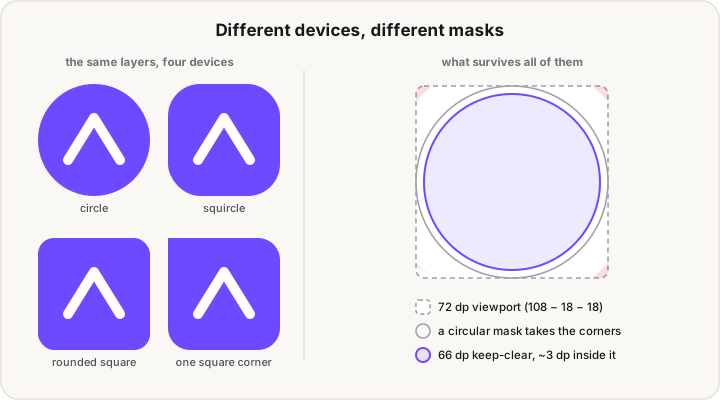
That margin isn't only for masking. The system also uses it for motion effects like parallax and pulsing, so artwork pushed out toward the edge can be moved as well as cropped.
The practical rule: draw on 108, keep anything that matters inside the center 66, and treat the ring between 66 and 108 as bleed. There's a labeled diagram of the three zones in the App Icon Size Chart if you want to see them nested.
Do you still need the legacy PNG icons?
Probably not, and this is the question the density charts never ask.
Google's documentation is direct about what those files are for: legacy launcher icons serve Android 7.1 (API level 25) and lower, devices that can't render adaptive icons. If your minSdk is 26 or higher, no device that installs your app will ever load them.
There's a second reduction available. Adaptive icon layers accept vector drawables as well as bitmaps, and Google's own guidance prefers vectors. A vector layer is resolution independent, so it needs no density variants at all. Between the two facts, a modern project's icon set collapses to something like this:
res/
  mipmap-anydpi-v26/
    ic_launcher.xml          # <adaptive-icon>: background + foreground + monochrome
  drawable/
    ic_launcher_background.xml   # vector, one file
    ic_launcher_foreground.xml   # vector, one file
    ic_launcher_monochrome.xml   # vector, one file
Plus the 512 px Play Store PNG, which is uploaded to the Play Console rather than bundled.
That's three vectors instead of fifteen PNGs. The density table still matters if you're working from raster artwork, or if you genuinely support API 25 devices, and that's why the table above is accurate rather than dismissive. But most projects are carrying those files out of habit.
What is ic_launcher_round, and do you need it?
Almost certainly not. android:roundIcon was introduced in Android 7.1 so that launchers preferring circular icons, like the Pixel launcher of the day, could request a dedicated round variant. The framework returns either android:icon or android:roundIcon depending on the device build.
Adaptive icons made it redundant. The whole point of the adaptive model is that the system masks your layers into whatever shape it wants, circle included, so a hand-made round variant solves a problem that no longer exists. It was only ever needed at API 25.
It isn't formally deprecated, so nothing breaks if you keep it. But on minSdk 26+ it's a file that ships, occupies space, and is never read.
What size is the Play Store icon?
512×512 pixels, 32-bit PNG with an alpha channel, under 1024 KB. This one is genuinely required, and it's separate from anything in your APK. You upload it in the Play Console.
Google also restricts what can be in it: no badges or text implying ranking, price, or category, so no "Top Free" flashes and no "#1" corner ribbons.
Design it as a full-bleed square. Play applies its own rounding and shadow when it displays your listing, so corners you round yourself get rounded twice.
What our export gives you, and what you can delete
Our free App Icon Generator writes the maximum-compatibility set, because it has no way of knowing your minSdk. From one master image it produces:
android/
  mipmap-mdpi/     ic_launcher.png (48)   ic_launcher_round.png (48)   ic_launcher_foreground.png (108)
  mipmap-hdpi/     ic_launcher.png (72)   ic_launcher_round.png (72)   ic_launcher_foreground.png (162)
  mipmap-xhdpi/    ic_launcher.png (96)   ic_launcher_round.png (96)   ic_launcher_foreground.png (216)
  mipmap-xxhdpi/   ic_launcher.png (144)  ic_launcher_round.png (144)  ic_launcher_foreground.png (324)
  mipmap-xxxhdpi/  ic_launcher.png (192)  ic_launcher_round.png (192)  ic_launcher_foreground.png (432)
  mipmap-anydpi-v26/  ic_launcher.xml   ic_launcher_round.xml
  drawable/           ic_launcher_background.xml
  playstore-icon.png (512)
If your minSdk is 26 or higher, you can delete every ic_launcher_round.* file and both round XML entries immediately. If you replace the raster foreground with a vector, the per-density ic_launcher_foreground.png files go too, and so do the legacy ic_launcher.png files.
Two more things worth knowing about that output. The background it ships is Android Studio's stock green-grid template vector, which you should replace with your own. And the adaptive icon XML declares <background> and <foreground> only, with no <monochrome> layer, so themed icons fall back to a system-derived version. Android themed icons covers what that layer does and how to add it.
FAQ
What is the standard Android app icon size?
For adaptive icons, each layer is drawn on a 108×108 dp canvas. The older launcher icon is 48×48 dp, which becomes 48 to 192 px depending on the screen density bucket. The Play Store icon is a separate 512×512 px asset.
What is the 108 dp adaptive icon safe zone?
The safe zone is the center 66×66 dp. The masked viewport is 72×72 dp, which is the 108 dp canvas minus 18 dp on each side, and the 66 dp safe zone is the smaller area that survives whatever mask shape a device applies.
Which Android icon densities do I need?
If you're shipping raster layers: mdpi, hdpi, xhdpi, xxhdpi and xxxhdpi. ldpi and tvdpi exist in the docs but aren't generated by Android Studio and aren't worth producing. If you use vector drawables for your layers, you don't need density variants at all.
Can adaptive icon layers be SVG?
Not SVG directly. Android uses its own vector drawable XML format, which you generate from an SVG using Android Studio's Vector Asset tool. Once converted, the layer is resolution independent and needs no density copies.
Do I need ic_launcher_round?
Only if you support API 25 or lower. It existed so Android 7.1 launchers could request a circular icon, and adaptive icons replaced that mechanism entirely by masking your layers to whatever shape the device uses.
Building for more than Android? The App Icon Size Chart has the equivalent tables for iOS, macOS, watchOS and the web. Shipping on iOS specifically? Liquid Glass app icons covers Apple's layered icon model, which is a close cousin of this one.