Favicon Sizes & Formats: The Complete 2026 Guide
Updated September 3, 2026

You need far fewer favicon files than most generators hand you. In 2026 a modern setup is three or four files: a multi-size favicon.ico, a scalable favicon.svg, a 180×180 apple-touch-icon.png, and a couple of PNGs in your web manifest for installable apps. That set covers browser tabs, bookmarks, iOS home screens, Android, and the tiny icon Google shows next to your result in search.
TL;DR. The favicon set that covers almost everything:
favicon.ico: 16, 32, and 48px packed into one file. Still the default browsers request at/favicon.ico.favicon.svg: one scalable file, sharp at any size, and it can flip colors for dark mode.apple-touch-icon.png: 180×180, opaque, for iOS "Add to Home Screen".192×192and512×512PNGs: referenced in your web manifest for PWAs.- Four
<link>tags wire it up. The old pile of a dozen PNGs is optional now.
What favicon sizes do you actually need in 2026?
Four files cover the modern web: a multi-size favicon.ico (16/32/48), a favicon.svg, a 180×180 Apple touch icon, and 192/512 PNGs for progressive web apps. Everything else is either optional or generated from those.
Here's the working set, what size each is, and where it shows up:
| File | Size(s) | Format | Where it's used |
|---|---|---|---|
favicon.ico | 16×16, 32×32, 48×48 (one file) | ICO | Browser tabs, bookmarks, the default /favicon.ico request |
favicon.svg | scalable (any) | SVG | Chrome, Firefox, Edge; dark-mode aware |
apple-touch-icon.png | 180×180 | PNG | iOS "Add to Home Screen" |
icon-192.png | 192×192 | PNG | Android home screen, PWA |
icon-512.png | 512×512 | PNG | PWA install and splash screen |
| Maskable icon (optional) | 512×512 | PNG | Android adaptive PWA icon |
The 16 and 32 sizes are the ones that render in a browser tab, so they're the ones that have to stay legible. A logo with fine detail or small text turns to mush at 16 pixels. Lean on a single shape or a bold letter with strong contrast, and design it at a large size so the downscale is clean.
What's the difference between .ico, .png, and .svg favicons?
Each format does a different job. .ico is a legacy container that holds several small sizes in one file. .png is a plain raster image at a single fixed size. .svg is a vector that scales to any size and can respond to dark mode. A modern site uses all three: .svg where it's supported, .ico as the universal fallback, and .png for the platform-specific icons like Apple's.
| Format | What it is | Best for | Watch out for |
|---|---|---|---|
| ICO | Container holding multiple sizes (16/32/48) | The default /favicon.ico fallback every browser understands | It's raster, so it doesn't scale up cleanly |
| PNG | Single-size raster with transparency | Apple touch icon, Android and PWA icons | You need one file per size |
| SVG | Scalable vector, one file | Crisp tab icons at any density, dark-mode theming | Not rendered by Safari before version 26 |
There's a fourth you can ignore: animated GIF favicons technically work in a few browsers, but they're a novelty and Safari and most tab UIs won't play them. Skip it.
What is the favicon.ico file, and do you still need it?
Yes, keep it. favicon.ico is the file every browser looks for at your site root by default, even if you never add a <link> tag for it. The .ico format is a container, so a single favicon.ico can hold the 16×16, 32×32, and 48×48 frames at once, and the browser picks whichever it needs for a tab, a bookmark, or the address bar.
It's also your safety net. Older Safari versions and anything that doesn't render an SVG favicon fall back to the .ico, so shipping one means no browser is left without an icon. Put it at /favicon.ico, keep that URL stable, and you've covered the long tail of clients.
Should you use an SVG favicon?
For most sites, yes. An SVG favicon is one small file that stays sharp at any pixel density, from a 16px tab to a hi-DPI display, without shipping multiple raster sizes. Roughly 89% of browsers support it: Chrome and Edge since version 80, Firefox since 41. The gap is Safari, which only added SVG favicon support in version 26. That's why you still ship the .ico as the fallback.
The setup is one tag alongside the .ico:
<link rel="icon" href="/favicon.ico" sizes="any">
<link rel="icon" href="/favicon.svg" type="image/svg+xml">
The sizes="any" on the .ico line is a small trick: it nudges SVG-capable browsers to prefer the vector, while browsers that can't render SVG still grab the .ico. Keep the SVG simple. A favicon renders at 16 pixels, so a complex illustration with filters or fine strokes won't survive the shrink any better as a vector than as a PNG.
How do you make a favicon that adapts to dark mode?
Put a prefers-color-scheme media query inside the SVG file itself. Because an SVG can carry its own <style> block, one file can render dark ink on a light tab bar and light ink on a dark one, with no JavaScript and no second file.
<svg xmlns="http://www.w3.org/2000/svg" viewBox="0 0 32 32">
  <style>
    path { fill: #18181b; }
    @media (prefers-color-scheme: dark) {
      path { fill: #f4f4f5; }
    }
  </style>
  <path d="…your icon…" />
</svg>
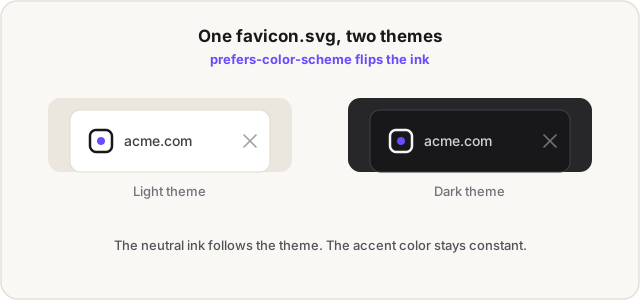
One honest caveat. Safari renders SVG favicons (from version 26) but ignores the media query inside them, so Safari users see whichever colour you set as the default. Make the default variant the one that reads on a light background, since that's the safe fallback, and treat the dark-mode swap as a nice-to-have for Chrome, Edge, and Firefox rather than something every visitor gets. This is a good example of why the .ico stays in the set: it's the version that always renders, everywhere.
What size is the Apple touch icon?
180×180 pixels, as a PNG, on a filled background. The Apple touch icon is the image iOS and iPadOS use when someone adds your site to their home screen. iOS doesn't read the standard sizes attribute for this, so it uses its own rel="apple-touch-icon" link, and it applies its own rounded-corner mask over whatever you give it.
Two rules keep it from looking broken:
- Make it opaque. iOS fills transparency with black, so a transparent background turns into a solid black square on the home screen.
- Leave a little breathing room, around 20 pixels of padding inside the 180, so your mark doesn't run into the corners the system rounds off.
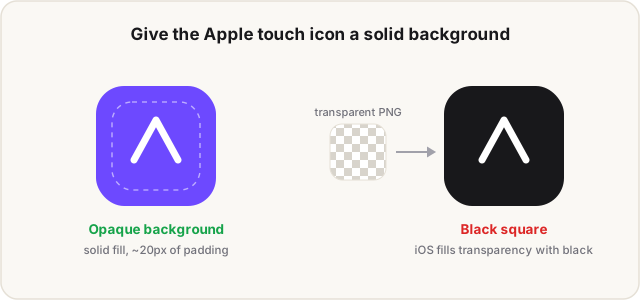
You only need the single 180×180. iOS downscales it for smaller placements, so the long list of apple-touch-icon sizes you see in older tutorials isn't necessary anymore.
What favicon does Google Search use?
Google shows a favicon next to your site's name in search results, and it has its own rules that are separate from what browsers want. The icon must be a square (a 1:1 ratio), at least 8×8 pixels, and Google recommends going larger than 48×48 so it looks right across surfaces. Any valid favicon format works, and Google reads the icon from a <link> tag in your homepage's <head> using rel="icon", rel="shortcut icon", or rel="apple-touch-icon".
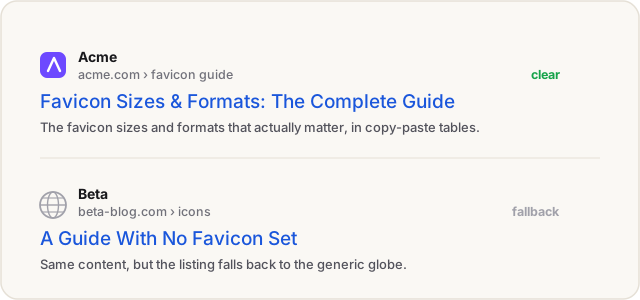
A few specifics decide whether it actually appears:
- One favicon per hostname.
www.example.comandblog.example.comcan each have their own, but subdirectories likeexample.com/newsinherit the root domain's icon. - Keep the URL stable. Don't change the favicon's path often. Google recrawls it on its own schedule, not on demand.
- Don't block the crawlers. Both Googlebot and Googlebot-Image need to reach your favicon and homepage, so make sure
robots.txtdoesn't wall them off.
Favicons aren't a ranking factor, so this won't move your position. But the icon is part of how your result looks in the list, and a missing or generic globe icon makes a listing easier to skip past.
Do you need all 20 favicon sizes?
No. The giant favicon package with 20-plus files is a holdover from a decade ago, when different browsers, Windows tiles, and old iOS versions each demanded their own exact size. Modern browsers downscale a couple of well-chosen sizes cleanly, so the working set is small.
You'll still see generators output the legacy extras: a stack of apple-touch-icon sizes, mstile PNGs for Windows tiles, a browserconfig.xml, and a <link rel="shortcut icon"> tag. None of it hurts. shortcut icon in particular is non-standard, and browsers ignore the shortcut part and just read it as icon, so it's harmless but pointless in new markup. If you inherit a project stuffed with these files, leave them. If you're starting fresh, you can skip straight to the four-file set.
The HTML: which link tags to use
Four tags cover the modern set. Drop the files in your site root and paste this into your <head>:
<link rel="icon" href="/favicon.ico" sizes="any">
<link rel="icon" href="/favicon.svg" type="image/svg+xml">
<link rel="apple-touch-icon" href="/apple-touch-icon.png">
<link rel="manifest" href="/site.webmanifest">
The manifest line points to a small JSON file that lists your 192 and 512 PNGs, which is what a browser reads before offering to install your site as an app:
{
  "icons": [
    { "src": "/icon-192.png", "sizes": "192x192", "type": "image/png" },
    { "src": "/icon-512.png", "sizes": "512x512", "type": "image/png" }
  ]
}
If you're on Next.js, don't paste any of this. The App Router generates these tags from files you drop in app/, and hand-writing them alongside the file conventions is how you end up with duplicate or missing icons. The Next.js guide covers the conventions and which source wins when more than one is present.
One gotcha worth knowing before you go debugging: browsers cache favicons hard. If you change yours and the tab still shows the old one, that's usually the cache, not your markup. A hard reload or an incognito window confirms it in a couple of seconds, and building the favicon generator taught us that "my favicon isn't updating" is almost always caching or a wrong file path, not a missing size.
Make the whole set from one image
Our free favicon generator takes an image, a letter, or an emoji and writes the full package: a multi-size favicon.ico, the 16 and 32px PNGs, a 180×180 Apple touch icon, 192 and 512px icons, a site.webmanifest, and the <head> snippet to paste. It runs entirely in your browser on a canvas, so your image is never uploaded anywhere.
If you don't have a mark yet, generate one first. IconsCove makes an icon from a text prompt, and you can run the result through the favicon generator, or through the App Icon Generator for the full native app pack.
FAQ
What is the best favicon size?
Design at a large square, 512×512 or bigger, and export down. For the files themselves, the ones that matter most are the 16×16 and 32×32 that show in a browser tab, a scalable SVG for sharp rendering, and a 180×180 for the Apple touch icon. Everything else derives from a large master.
Is .ico or .png better for a favicon?
They're for different jobs. Use a multi-size .ico for the default /favicon.ico that every browser understands, and PNGs for the platform-specific icons like the 180×180 Apple touch icon and the 192/512 PWA icons. A complete setup uses both, plus an SVG where it's supported.
Can a favicon be a JPG?
Skip it. Favicons want transparency and crisp edges at tiny sizes, and JPG has no alpha channel and adds compression artifacts that show badly at 16 pixels. Use ICO, PNG, or SVG instead.
Why isn't my favicon updating?
Almost always caching. Browsers hold onto favicons aggressively, so a change often won't show until you hard-reload, open a private window, or wait out the cache. If it's still wrong after that, check the file path and that /favicon.ico actually returns your icon. There's a full walkthrough in Favicon Not Showing Up? A Diagnostic Checklist.
Do favicons affect SEO?
Not as a ranking factor. But Google shows your favicon next to your result in search, so a clear, square icon (larger than 48×48) makes your listing look intentional instead of falling back to a generic globe. That's a click-through detail, not a rankings one.
What's the difference between a favicon and an app icon?
A favicon is the small web icon for browser tabs and search results. An app icon is the launcher icon for a native iOS or Android app, which has its own sizes and store rules. For the full breakdown of every platform size, see the App Icon Size Chart.
Need every platform size, not just the web set? The App Icon Size Chart 2026 has the copy-paste tables for iOS, Android, macOS, and PWA. Already have artwork at the wrong dimensions? The image resizer handles one-off sizes in your browser.