Next.js Favicon and App Icons (and What Silently Overrides What)

Drop a favicon.ico or an icon.png into app/ and Next.js writes the <link> tags for you. That part takes ten seconds. The part that costs an afternoon is what happens when you have more than one icon source, because the rules for which one wins are not in the documentation, and the most widely repeated answer online describes a bug that was fixed two years ago.
Everything below was tested against Next.js 16.2.2 on a production App Router site, by adding files, reading the emitted <head>, and requesting the icon URLs directly.
TL;DR:
- Put
favicon.ico,icon.png, orapple-icon.pnginapp/. Next.js emits the tags. That's the whole happy path. metadata.iconssuppresses youricon.*andapple-icon.*files. Set it and those<link>tags disappear from<head>, even though the routes still return 200.favicon.icodoes not suppress anything. It coexists withicon.pngand both tags emit.- A static
app/icon.pngis served at/icon.png?<hash>, not/icon. Only the code-generatedicon.tsxanswers at the bare path. - That last one silently breaks manifests. Ours pointed at
/iconand 404'd for months.
How do you add a favicon in Next.js?
Put the file in app/ and stop there. Next.js reads it at build time, works out the type and dimensions, and injects the tag.
app/
  favicon.ico        → <link rel="icon" href="/favicon.ico" sizes="any">
  icon.png           → <link rel="icon" href="/icon.png?<hash>" sizes="256x256">
  apple-icon.png     → <link rel="apple-touch-icon" href="/apple-icon?<hash>" sizes="180x180">
You don't add anything to metadata. You don't edit <head>. For most sites a single icon.png plus an apple-icon.png is the complete setup, and the sizes come from the size chart rather than from anything Next.js-specific.
What files can go where?
The allowed extensions differ per convention, and they differ again depending on whether you're shipping an image or generating one in code. Next.js documents these in separate tables, which is how people miss that they don't match.
| Convention | Static file types | Generated | Valid locations |
|---|---|---|---|
favicon | .ico only | not possible | app/ only |
icon | .ico, .jpg, .jpeg, .png, .svg | .js, .ts, .tsx | app/**/* |
apple-icon | .jpg, .jpeg, .png | .js, .ts, .tsx | app/**/* |
Three consequences worth internalizing. apple-icon rejects SVG while icon accepts it, so a shared SVG source can't serve both. You cannot generate a favicon from code at all, which is why every dynamic-favicon tutorial actually uses icon.tsx. And favicon.ico is the only one pinned to the app root, so per-route icons have to use icon instead.
Multiple icons work by number suffix: icon1.png, icon2.png. They sort lexically, which bites at ten or more files, where icon10.png sorts before icon2.png.
What URL does your icon actually get?
Not the one the docs show. The icon section of the Next.js documentation gives the emitted href as /icon?<generated>, and that's accurate for the code-generated form only. Ship a static PNG and you get the filename back, with a build hash as the query string:
<!-- app/icon.png, a static file -->
<link rel="icon" href="/icon.png?icon.0s~w430nt.kby.png" sizes="256x256" type="image/png"/>

<!-- app/apple-icon.tsx, generated with ImageResponse -->
<link rel="apple-touch-icon" href="/apple-icon?e856a044269e0ef3" type="image/png" sizes="180x180"/>
Request both bare paths on the same running server and the split is unambiguous:
GET /icon         → 404
GET /apple-icon   → 200  image/png  5015 bytes
The generated icon is a route handler, so it answers at its route. The static file is not a route, it's an asset, and it lives at its own filename. Nothing warns you about the difference, and it matters the moment something other than the <head> tag needs to reference your icon.
Note also that Next.js read sizes="256x256" off the file itself. It doesn't take your word for the dimensions, which is worth remembering when you hand-write a size somewhere else.
What happens when you set metadata.icons?
Your icon.* and apple-icon.* files stop appearing in <head>. This is the finding that cost the most to track down, so here it is in full.
Starting state, file conventions only, with favicon.ico, icon.png, and a generated apple-icon.tsx all present:
<link rel="icon" href="/favicon.ico?favicon.0w8l_sfk8uh-1.ico" sizes="32x32" type="image/x-icon"/>
<link rel="icon" href="/icon.png?icon.0s~w430nt.kby.png" sizes="256x256" type="image/png"/>
<link rel="apple-touch-icon" href="/apple-icon?e856a044269e0ef3" type="image/png" sizes="180x180"/>
Now add a single key to the root layout's metadata export:
export const metadata: Metadata = {
  icons: { icon: "/some-icon.png" },
};
The emitted <head> becomes:
<link rel="icon" href="/favicon.ico?favicon.0w8l_sfk8uh-1.ico" sizes="32x32" type="image/x-icon"/>
<link rel="icon" href="/some-icon.png"/>
Both icon.png and the Apple touch icon are gone. Only the icon sub-key was set, yet apple-icon was dropped too. The apple-icon route still returns 200, so the asset is built, reachable, and completely unreferenced. iOS has no way to find it.
| Configuration | favicon.ico | icon.* | apple-icon.* |
|---|---|---|---|
| File conventions only | emits | emits | emits |
Plus metadata.icons | still emits | suppressed | suppressed |
That's the trap. Adding one icon through the metadata API silently removes the icons you set up through files, and because the routes keep returning 200 nothing in your build or your logs looks wrong. If you use metadata.icons, declare every icon there, including apple.
Does favicon.ico override icon.png?
No, and this is where most of the internet is out of date. Both tags emit, with the favicon first, as the block above shows.
You will find a lot of writing claiming that favicon.ico overwrites icons defined in metadata. That behavior was real: it was reported as issue #55767 against the Next.js repo. It was also fixed, in PR #67982, and the issue is closed. Posts still repeating it are describing a version you're probably not running, and the common advice that follows from it, moving favicon.ico into public/ to get your metadata icons back, solves a problem you no longer have.
What actually happens now is that favicon.ico and icon.png both end up in <head> as competing rel="icon" declarations, and the browser picks. Per MDN, selection goes on media, type, and sizes, and when candidates tie the last one declared wins. So a leftover favicon.ico isn't replaced by your new icon. It sits alongside it and keeps competing.
Why is my favicon still the old one?
Usually because a stale file is still being served, not because Next.js is misconfigured. We hit exactly this on IconsCove: an old favicon.ico sat in app/ next to a newer icon, both emitted, and the browser kept choosing the one we thought we'd replaced. The fix was deleting the file, not adding configuration.
Browser caching is the other half, and it's stubborn in a way a hard reload doesn't fix, because Chromium keeps favicons in a separate database from the HTTP cache. We wrote that up in full in the favicon diagnostic checklist, which covers the caching mechanism and a symptom-to-cause table.
Next.js-specific things to check first: delete .next and rebuild, confirm only one icon source exists in app/, and view source on the deployed page to see which tags actually shipped.
Should you generate icons with code or ship a static file?
Generate simple marks, ship artwork. ImageResponse renders through Satori, which is a flexbox layout engine rather than a browser. It implements a subset of CSS: no calc, no 3D transforms, no <style> or <script> tags. Boxes, text, backgrounds, and border radius all work. Anything genuinely drawn does not.
Satori does accept <img>, and base64 data is the recommended way to feed it, so there's an apparent escape hatch for real artwork. It isn't one. Embedding a PNG means shipping a static image through a render step whose purpose was to avoid shipping static images.
We found the boundary the direct way. Our app/icon.tsx drew the brand mark at 32×32 through ImageResponse and that was fine, right up until the mark became a detailed owl that couldn't be expressed as flexbox primitives and turned to mush at favicon size anyway. It became a static 256×256 PNG, which is still what ships. The apple-icon.tsx stayed generated, because at 180×180 it's a simple shape on a solid fill, which is what Satori is actually for.
The other tradeoff is build cost. Generated icons are statically optimized and cached unless they use request-time APIs, so this is not a per-request penalty. It's a per-build one, and it's small.
What about the web app manifest?
This is where the /icon 404 turns into a real bug, and ours did. Our app/manifest.ts declared:
icons: [
  { src: "/icon", sizes: "32x32", type: "image/png" },
  { src: "/apple-icon", sizes: "180x180", type: "image/png" },
]
Wrong in two ways at once. /icon 404s, for the reason above, so the first entry pointed at nothing. And the declared 32x32 didn't match app/icon.png, which is actually 256×256. The /apple-icon entry worked only by accident, because that one is generated.
The manifest also needs sizes that Next.js has no opinion about. Chromium wants 192×192 and 512×512 before it will offer to install a PWA, and we had neither, so the app wasn't installable and nothing ever said so. The corrected version points at stable files in public/ instead of at hashed metadata routes:
icons: [
  { src: "/icons/icon-192.png", sizes: "192x192", type: "image/png", purpose: "any" },
  { src: "/icons/icon-512.png", sizes: "512x512", type: "image/png", purpose: "any" },
  { src: "/icons/maskable-512.png", sizes: "512x512", type: "image/png", purpose: "maskable" },
]
The rule that falls out: manifest icons should reference files you control the URL of. The icon and apple-icon conventions exist to populate <head>, and their URLs carry build hashes you can't hardcode.
One note on the maskable entry, since it's easy to get wrong. A maskable icon gets cropped to the launcher's shape, so the artwork needs padding inside a safe zone and no transparency at all. Reusing an any icon as maskable is how you end up with a logo whose edges are shaved off.
Here is what that costs, using the two icons this site actually ships. Both are the real files from public/icons/, with the same circular mask applied:
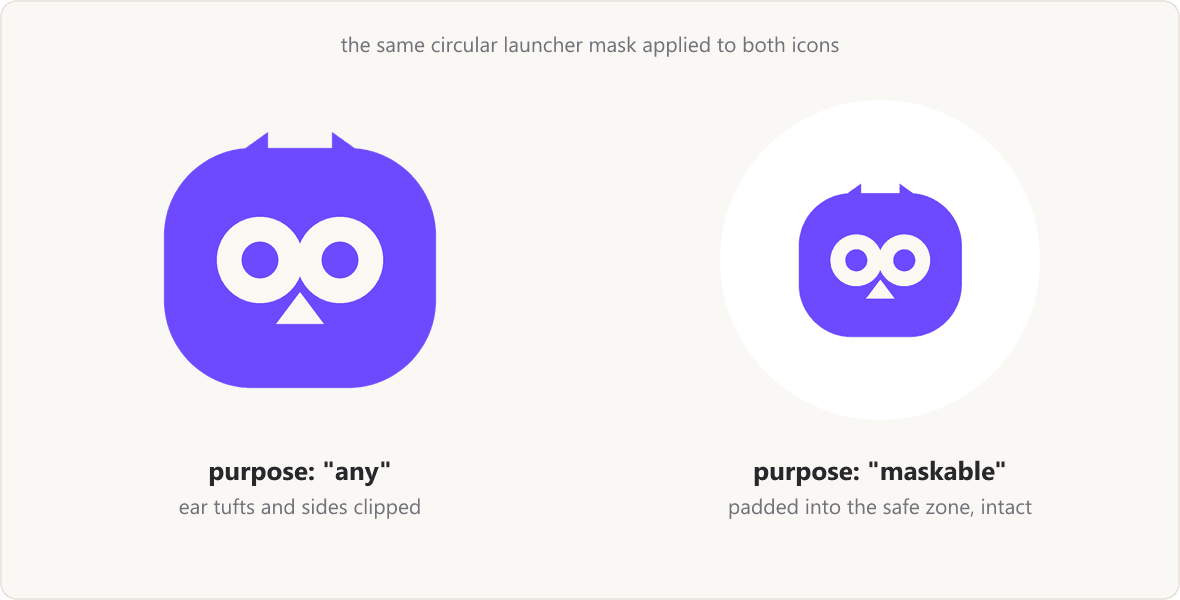
The left one is not a broken file. It's a correct any icon, doing exactly what it should when nothing crops it. It just has no margin to give up, which is the entire reason maskable is a separate declaration rather than a flag.
What our setup looks like now
For reference, the whole icon surface of this site:
app/
  icon.png           256×256 static PNG      → tab favicon
  apple-icon.tsx     180×180 via ImageResponse → iOS home screen
  manifest.ts        → 192, 512, maskable-512 from public/icons/
public/icons/
  icon-192.png  icon-512.png  maskable-512.png
No favicon.ico, no metadata.icons. One source per surface, which is the configuration with the fewest ways to go wrong.
If you need the underlying sizes rather than the Next.js plumbing, the app icon size chart has the full per-platform table, and the favicon guide covers formats and the SVG support cutoff.
FAQ
Where does favicon.ico go in a Next.js App Router project?
In app/, at the top level. It's the only icon convention that can't live in a nested route segment, and it can't be generated from code. If you need per-route icons or a generated one, use icon instead.
Why does /icon return 404?
Because you have a static app/icon.png rather than a generated app/icon.tsx. Static icon files are served at their filename with a build hash, like /icon.png?<hash>. Only the code-generated form is a route handler that answers at /icon.
Can I use an SVG favicon in Next.js?
Yes for icon, which accepts .svg and gets sizes="any" automatically. No for apple-icon, which only takes .jpg, .jpeg, and .png. Keep an .ico or PNG fallback regardless, since SVG favicon support only reached Safari in version 26.
Do I need both favicon.ico and icon.png?
No, and having both is a common cause of the wrong icon showing. They both emit rel="icon" tags and then compete for the browser's selection. Pick one.
Why did my apple-touch-icon disappear?
Almost certainly because something set metadata.icons. Doing so suppresses both the icon.* and apple-icon.* file conventions, even if you only specified the icon key. Declare apple there too, or drop metadata.icons and go back to files.
Does any of this differ in the Pages Router?
Yes. None of these file conventions apply. In the Pages Router you write the <link> tags yourself inside next/head, and precedence is whatever order you put them in.