Favicon Not Showing Up? A Diagnostic Checklist
Updated September 3, 2026

Almost every missing favicon is one of four problems, and they're worth checking in this order: the file isn't being served at the URL you think it is, the <link> tag points somewhere wrong, the browser is showing a cached icon from a store that a hard reload doesn't touch, or you're looking at Google search results and Google hasn't recrawled your site yet. Open the icon's URL directly and you'll know within seconds which one you have.
TL;DR. Work the list in this order:
- Open
/favicon.icoin a browser tab. A 404 or a page of HTML means it's a path problem, and nothing else you change will help until that's fixed. - If the URL serves the right image but the tab shows the old one, that's the favicon cache. Chromium keeps favicons in its own database, separate from the HTTP cache, so Ctrl+F5 doesn't clear it. Add
?v=2to the icon URL in your link tags. - If it's missing from Google search, give it time. Google says recrawling can take several days to several weeks.
- On Next.js,
favicon.icoonly works at the top level ofapp/. Anywhere else it's ignored.
Start here: open the favicon's URL directly
Before you touch a single line of markup, load the icon's URL in a browser tab. Type yoursite.com/favicon.ico and look at what comes back. This is the only check that separates a server problem from a markup problem from a cache problem, and it takes about five seconds.
Four things can happen, and each one points somewhere different:
| What you get back | What it means | Where to go next |
|---|---|---|
| 404 | The file isn't at that path. Either it was never deployed or it's in the wrong directory. | Fix the path or the deploy. Nothing else matters until this returns an image. |
| A page of HTML | A catch-all route is answering for the icon. Common on single-page apps, where every unmatched URL returns index.html with a 200 status. | Exclude static files from the catch-all, or serve the icon from a path your router ignores. |
| The old icon | Your file and path are fine. Something upstream is caching it, usually a CDN or a reverse proxy in front of your server. | Purge that URL at the edge. Browser tricks won't help. |
| The new icon | The server side is correct. The problem is in your HTML or in the browser. | Keep reading. |
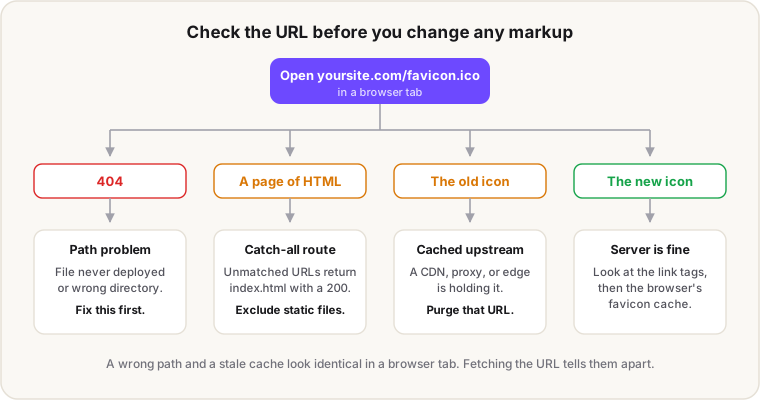
The reason this check goes first is that a wrong path and a stale cache produce exactly the same symptom in a browser tab, and people usually guess wrong about which one they have. Fetching the URL removes the guesswork.
Why isn't my favicon showing in the browser tab?
If the URL serves the right image, the next suspect is your <link> tags. Browsers don't just take the first icon they find. When there are several <link rel="icon"> elements, the browser compares their media, type, and sizes attributes and picks the most appropriate one. If two are equally appropriate, the last one declared wins.
That last-one-wins rule causes a specific bug. A stale tag left at the bottom of your <head>, pointing at a file you deleted six months ago, will beat the correct tag above it. Browsers do recover from this: if the icon they picked turns out to be unusable, because the format isn't supported or the file doesn't load, they fall through to the next-most appropriate one. But if that dead file still returns a 200 with something broken in it, there's nothing to fall through from.
A few other things to look for in the markup:
rel="shortcut icon"isn't a real value. MDN is blunt about it: theshortcutkeyword is non-conforming, browsers ignore it, and authors shouldn't use it anymore. Browsers read the tag as plainicon, so it does no harm. It just isn't doing what people think it's doing.- Check the path resolution.
href="favicon.ico"without the leading slash resolves relative to the current page, so it breaks on any URL below the root. Use/favicon.ico. - Cross-origin icons can't be fixed with
crossorigin. That attribute isn't supported forrel="icon"in Chromium-based browsers. If you're serving the icon from another origin and it isn't loading, move it or serve it through your own domain.
Why does the old favicon keep showing after I changed it?
Because your browser stores favicons somewhere your hard reload doesn't reach. In Chromium, favicons live in a standalone SQLite database managed by the history backend, with its own tables for icons, bitmaps, and the mapping between pages and icons. It's a different store from the HTTP cache. When you press Ctrl+F5 you're clearing the one that doesn't hold the tab icon.
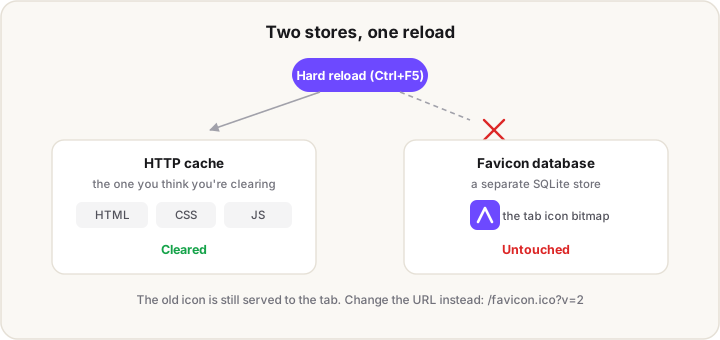
The store is also built to hold on to what it has. When an icon needs refreshing, Chromium marks the record as out of date rather than deleting it, so the old bitmap stays in the table until something replaces it. Even the bookkeeping is throttled: the timestamp that tracks when an icon was last requested is only written every ten days, and earlier updates are ignored. None of this is a bug. It's a cache doing its job on a resource nobody expects to change.
The fix that actually works is to change the URL, because a new URL is a new record:
<link rel="icon" href="/favicon.ico?v=2">
<link rel="icon" href="/favicon.svg?v=2" type="image/svg+xml">
Bump the number whenever you change the artwork. It costs nothing and it sidesteps the whole problem.
How do I clear the favicon cache?
There's no single button for it, which is why the version query above is the practical answer. If you want to see the change with your own eyes, the most reliable test is a device or browser that has never visited the site. Failing that, clear browsing history alongside cached files rather than cached files on their own, because the favicon records are tied to history entries.
One caveat, because you'll find confident advice in both directions online: private and incognito windows are not a dependable test. Some write-ups insist a private window shares the same favicon store and shows you the stale icon anyway, others insist it bypasses the cache completely. The behaviour isn't documented in a way that settles it, so don't build your debugging on it. Fetching the icon URL directly tells you about the server, and a device that has never seen your site tells you about a first-time visitor. Those two answers are enough.
Why is my favicon not showing in Google search results?
Usually because Google hasn't recrawled your homepage yet. Google's own documentation says crawling can take anywhere from several days to several weeks, and there's no way to force it beyond requesting indexing for your homepage with the URL Inspection tool in Search Console.
If it's been longer than that, work through the requirements, because Google's rules are different from what browsers want:
- The icon must be square with a 1:1 aspect ratio, at least 8×8 pixels. Google recommends going larger than 48×48 so it renders well across surfaces.
- Both Googlebot and Googlebot-Image need access. If
robots.txtblocks either one from your homepage or the icon file, the favicon can't be picked up. - One favicon per hostname. Subdomains can each have their own, but subdirectories can't.
example.com/shopshows whateverexample.comshows. - Keep the URL stable. Google recrawls on its own schedule, so an icon path that changes often may never settle.
- The
hrefdoesn't have to be on your domain. A relative path, an absolute path, or a URL on a CDN are all acceptable.
Two things worth knowing before you spend an afternoon on this. Google states plainly that a favicon isn't guaranteed to appear even when every guideline is met. And icons it judges inappropriate get replaced with a default one rather than shown. Favicons also aren't a ranking factor, so this is a presentation detail, not an SEO emergency.
Why isn't my favicon showing in Next.js?
Most likely because the file is in the wrong place. In the App Router, favicon.ico is only valid at the top level of app/. Put it in a nested route folder and Next ignores it. The rules for the three icon conventions differ in ways that catch people out:
| File | Accepted formats | Where it can live |
|---|---|---|
favicon | .ico only | Top level of app/ only |
icon | .ico, .jpg, .jpeg, .png, .svg | Anywhere under app/ |
apple-icon | .jpg, .jpeg, .png | Anywhere under app/ |
Note that apple-icon doesn't accept SVG, so an apple-icon.svg silently does nothing. You also can't generate a favicon from code the way you can with icon.tsx and apple-icon.tsx. If you want a generated icon, use the icon convention.
The other trap is having icons in two systems at once. A public/favicon.ico and an app/favicon.ico both want to answer for /favicon.ico, and you now have to reason about which one wins after every deploy. Pick one. This site runs on Next.js 16 and has no public/favicon.ico at all: the icons come from app/icon.png, app/apple-icon.tsx, and app/manifest.ts, and Next writes the <link> tags. One source, nothing to reconcile.
There's a sharper version of that trap that catches people who did everything right. Setting metadata.icons suppresses the icon.* and apple-icon.* file conventions entirely, so your Apple touch icon can vanish from <head> while its route keeps returning 200. We tested the precedence rules and wrote them up in the Next.js icon guide.
Why don't my web manifest icons load?
The usual cause is a relative path that resolves somewhere you didn't expect. In a web app manifest, a relative src resolves against the manifest's own URL, not the page URL. If your manifest sits at /static/manifest.json and lists "src": "icons/icon-192.png", the browser looks for /static/icons/icon-192.png.
{
  "icons": [
    { "src": "/icon-192.png", "sizes": "192x192", "type": "image/png" },
    { "src": "/icon-512.png", "sizes": "512x512", "type": "image/png" }
  ]
}
Leading slashes make the paths absolute and take the question off the table.
Two more things break manifest icons quietly. Icon fetching is governed by the img-src directive in the Content Security Policy of the manifest's owner document, so a strict CSP that doesn't allow your icon host will block them with no obvious symptom. And leaving out type forces the browser to sniff the format instead of skipping ones it can't use, which is slower and less predictable.
Why is my iOS home screen icon a black square?
Because the source PNG has a transparent background. iOS fills transparency on the Apple touch icon with black, so a mark exported on a transparent canvas becomes a black tile with your logo on it. Export it on a solid background at 180×180 and it renders correctly. The full explanation, along with the padding rule, is in the favicon sizes and formats guide.
The whole checklist in one table
| Symptom | Likely cause | Fix |
|---|---|---|
/favicon.ico returns 404 | File not deployed, or wrong directory | Correct the path; confirm the file is in the build output |
/favicon.ico returns HTML | Catch-all route answering for static files | Exclude static assets from the catch-all |
| Icon URL is correct, tab shows the old one | Browser's separate favicon database | Add ?v=2 to the icon URLs in your link tags |
| Old icon served at the URL itself | CDN or proxy cache | Purge that URL at the edge |
| Icon shows on some pages only | Relative href without a leading slash | Use /favicon.ico |
| Wrong icon of several | Last matching <link> wins | Delete stale icon tags |
| Nothing in Google Search | Not recrawled yet, or crawler blocked | Wait; check robots.txt for Googlebot and Googlebot-Image |
| Missing in Next.js | favicon.ico outside the root of app/ | Move it to app/, or use the icon convention |
apple-icon.svg ignored | Apple icon convention doesn't accept SVG | Export a PNG |
| Manifest icons don't load | Relative src resolved against the manifest URL, or CSP img-src | Use absolute paths; allow the host in CSP |
| Black square on the iOS home screen | Transparent Apple touch icon | Re-export opaque at 180×180 |
Rebuild the set from one image
If the diagnosis lands on "the files themselves are a mess", it's usually faster to regenerate them than to repair them one at a time. Our free favicon generator takes an image, a letter, or an emoji and writes a multi-size favicon.ico, the 16 and 32px PNGs, a 180×180 Apple touch icon, the 192 and 512px PWA icons, a site.webmanifest, and the <head> snippet to paste in. It runs on a canvas in your browser, so nothing gets uploaded.
Building that tool is where this checklist came from. The bug reports we saw were almost never about a missing size. They were wrong paths and stale caches, over and over, which is why "open the URL first" is the first step here rather than a footnote.
FAQ
Why is my favicon not showing up?
Check the icon's URL before anything else. Open yoursite.com/favicon.ico directly: a 404 means a path problem, a page of HTML means a catch-all route is intercepting it, and the correct image means the problem is in your <link> tags or in the browser's favicon cache.
Why won't my favicon update after I changed it?
Chromium stores favicons in a separate SQLite database from the HTTP cache, so a hard reload doesn't refresh the tab icon. Add a version query to the icon URL in your link tags, like /favicon.ico?v=2, which makes the browser treat it as a new file.
How long does Google take to show a new favicon?
Several days to several weeks, according to Google's documentation. You can request indexing for your homepage with the URL Inspection tool in Search Console, but there's no way to force the favicon crawl itself.
Why does my favicon work locally but not in production?
Usually the file isn't in the deployed build, or a CDN is serving an older copy. Open the production URL for the icon directly. If it 404s, it's a build or deploy issue. If it returns the previous icon, purge that URL at your CDN.
Does a missing favicon hurt SEO?
Not as a ranking factor. Google doesn't rank sites on favicons. It does show one next to your result, so a missing icon means a generic fallback in the search listing, which is a click-through detail rather than a rankings one.
Where should the favicon file go in Next.js?
favicon.ico goes at the top level of the app/ directory and nowhere else. For anything other than an .ico, use the icon convention, which accepts PNG and SVG and can live in any route segment.
Need to know which files to ship in the first place? The favicon sizes and formats guide covers the modern set and the HTML that wires it up. Building native app icons too? The App Icon Size Chart has every platform dimension, and the App Icon Generator exports the full pack from one 1024px master.